Videos, Manuals, and FAQs
OHD
What is OHD?
OHD stands for “Optical Hit Detection” which enables
your smartphone camera to detect hits in real-time. The data captured at point of impact allows
OHD to present a user with accurate group size, split times, assign point value
to zones on target, and more!
What do I need to use OHD?
All you need is a premium subscription, your smartphone, a printer with 8.5 x 11 inch paper, and a tripod or phone stand to hold your smartphone steady at the range. Any stand will work that holds the phone steady and can be adjusted easily. We recommend this for indoor ranges and this for free standing outdoors.
Why should I use OHD to improve my training?
We wanted to remove barriers to entry for people
to be able to have fun and improve their skills and track performance at the
range. OHD can take your training to the next level with minimal effort and
make the shooting range fun again.
Can I use Optical Hit Detection at any gun range? What about outdoors?
Because OHD uses all your typical equipment you
would bring to the range, yes! If you can place a tripod on a table pointing
downrange and can put up your own target, you can use OHD. Optical Hit
detection works both indoors and outdoors! We recommend placing your paper
target on a cardboard backer for best results.
What distance can I use OHD out to?
For most situations we recommend 10 yards, but depending on lighting and your individual device, you may be able acquire and track your target at distances up to 20 yards with the latest generation smartphones.
7 yards is the optimal recommended max distance for phones without telephoto camera.
How do I know if my smart phone has a telephoto camera?
We have included a “Test Detection Distance”
feature for you to verify your phone’s distance capability in the app.
Can I digiscope with Optical Hit Detection?
Yes, it does work, however some case mounts block the required OHD lens at full zoom. We are working on an enhancement to make this a user selectable feature. Stay tuned…
Does OHD work on both iOS and Android?
Yes, OHD works on both iOS and Android.
Does OHD work on tablets?
For optimal experience we recommend using a smartphone.
Can I use any targets?
OHD requires a specific target which you can print right from your phone to any 8.5 x 11” printer. For best performance we recommend attaching the target to a cardboard or rigid paper backer. Check out our new large format targets for even more fun!
What are the (4) circles in the corners?
These are used to identify and acquire the
target. Please make sure they are
visible.
Will OHD detect shots on the entire page?
No, OHD will detect shots only within the area framed by the straight lines.
Can I print on 11 x 17” or larger paper?
While technically possible, the group size calculations will be incorrect. Please use 8.5 x 11 paper.
Can I have multiple 8.5 x 11” targets down range at the same time?
Yes, you can attach multiple targets at the same time. Please leave 4-6” between targets. You can adjust your tripod to aim and zoom to each target individually.
Can I re-use an existing target?
Yes,
OHD has a pasting feature which allows you to start a new session, and it will paste
(mask) off the existing holes. We
recommend reusing a target with no more than 20 holes. As always, for best performance use a fresh
target.
How is group size measured?
OHD uses the extreme spread of the furthest detected holes.
Why do my group size calculations appear off?
Our testing has shown users should not see more than 1/2 bullet width variation in measurement.
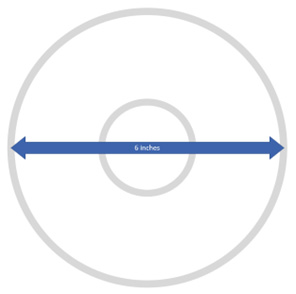
It’s important to make sure your target is printed to the proper scale. If given the choice you should select “Actual Size” when printing. Please verify that the larger of the 2 concentric circles is 6 inches in diameter.
How do I know my target is at the proper scale?
The larger of the 2 concentric circles should measure 6 inches.
What calibers will work best with OHD?
.22 or larger caliber is recommended.
How do I use Optical Hit Detection?
Please watch the How to use video. Click Here
What are some Pro tips to get the best performance out of OHD?
Thicker 8x11 paper used to print can create a more uniform tear as a bullet passes through. This can improve hit detection.
Like above, using a cardboard backer behind the paper target can make more uniform tears and improve hit detection.
Having uniform lighting on the target either indoors or outdoors can improve hit detection. For example, if there is a lot of light shining on only part of the target and other parts are dark it is possible this can result in false detection.
Be sure not to over-zoom when attempting to scan and lock onto a target, simply perform a small pinch to zoom when the red dot is centered on the target and allow the app to do the rest! With a small pinch if the target is centered, the app should automatically detect and zoom the rest of the way for you.
When shooting outdoors, it is best if the sun is shining overhead, from behind you or the side of the target. If the sun is directly behind the target (and backer), you will sometimes get light shining through bullet holes which can make it difficult for your smartphone to detect the holes.
VIDEOS
T300 SMART TARGETS
How do I set up the T300 smart target system?
Please refer to the operator’s manual and the helpful how to videos below with guidance on secure hanging and use of the smart target system.
Do I have to own a SIG to use the T300 smart target system?
No, SIG CONNECT and the T300 smart target system was developed for anyone looking to have fun and improve. This system is designed to work with a wide range of firearms and ammunition types. Please reference the T300 operator’s manual below for recommended calibers.
Can I use the T300 Smart Target system at any range?
It is recommended to always check with your range and range officers before using the T300 smart target system. Due to the weight of the system, we recommend NEVER attempting to hang and send the system downrange before checking with a range officer. Ideal usage is at your own, outdoor range where the system can be secured in a stationary position.
MANUALS
Compare Products
Items